How can I share a full path link to others?
As for URL, I made it by pushing Link button.
However, this ferture is not available in sharing a full path link.
Please tell me how to share a full path link.
Hi @kota
I am not sure exactly the question, what do you mean by full path link?
You can always just copy the address in your browser:
You can also create an automation to post the link to comment or description of a card, if it helps...
Thank you for your reply.
"Full path" indicates a specific address of each file or folder.
Like this:
C:\Users\****\Documents\Adobe\Photoshop Cloud Associates
My boss and I share one online drive, and we often share some files.
I want to share original files so that both can edit.
To enable this, I need to tell a full path to my boss on Trello, but I always fail.
I can't attach this link on Trello.
Do you know a solution of such issues?
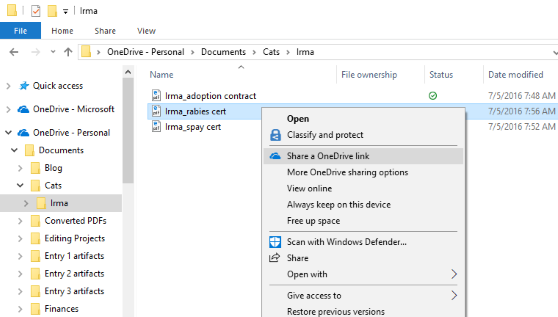
You can click here in explorer:
Then copy that link and paste it into Trello
Alternatively there is a Onedrive power-up
Thank you.
Our company has an internet storage that only employees can access instead of OneDrive.
We store and edit all files on that storage, so I'm looking for a way to share each file's path on Trello.
I copy a full path and paste it on Trello, at first the path seems complete (see the left picture).
Once I save that window and reopen the window, the initial letter ("/") is always lost (see the right picture).
So just by copying and pasting the path, I can't access to each file or folder (I need to add "/" at the start of each path).
It's a bit troublesome and I don't know why this always happens.
Do you have any ideas?
It looks like you're new here. Sign in or register to get started.