We asked Xray and Zephyr, two of the top test management vendors in the Atlassian Marketplace, to share with us the top benefits of using their apps with Jira Software.
Test Management right from Jira with Xray
Use the Xray Test Management for Jira app to create tests and track test coverage right from Jira Software. Xray provides native test management and enables teams to manage tests as Jira issues, making it easier for teams to collaborate on quality testing in one centralized location.
Creating a ‘Test’ and managing it as a Jira issue can be easily done with a click. Teams can select the type of test to run, specify the steps and expected results, and easily verify the validity of the test scenario. Manage testing from end-to-end by tracking requirements and test cycles, and link requirements and test cases directly to Jira issues so everyone on the team has visibility of the context.
Xray provides a quick overview of the status of the Epic, making it easier to make release decisions based on the test status.
Use Xray to create and track test coverage in Jira Software
Use a ‘Test Plan’ to define a testing scope and manage it as an issue in Jira Software to seamlessly integrate testing into project management workflows. Teams can include Test Plans in their sprint board to manage the test scope, track testing progress, and assign tests to team members. The Test Plan board consolidates progress for all the tests and teams can track each test execution history right within the Test Plan.
See consolidated test progress in the Xray Test Plan board view
Software teams often need to know if their product can be released or how their product is performing in a specific environment. Xray’s Test Coverage Report helps answer these questions by providing a high-level overview of the testing deliverables.
Xray supports a variety of testing approaches and test automation frameworks. With the Test Coverage Report, teams can have a birds-eye view of the quality status of their deliverables, regardless of the type of testing that’s being conducted. Easily filter test results based on priority status or other criteria, and click on the chart to see the detailed test requirements for more context.
The Test Coverage information is updated in real-time and is multi-dimensional. Teams can easily analyze stories and requirements taking into account the latest test results, or just the test results obtained on a specific release or specific test environment.
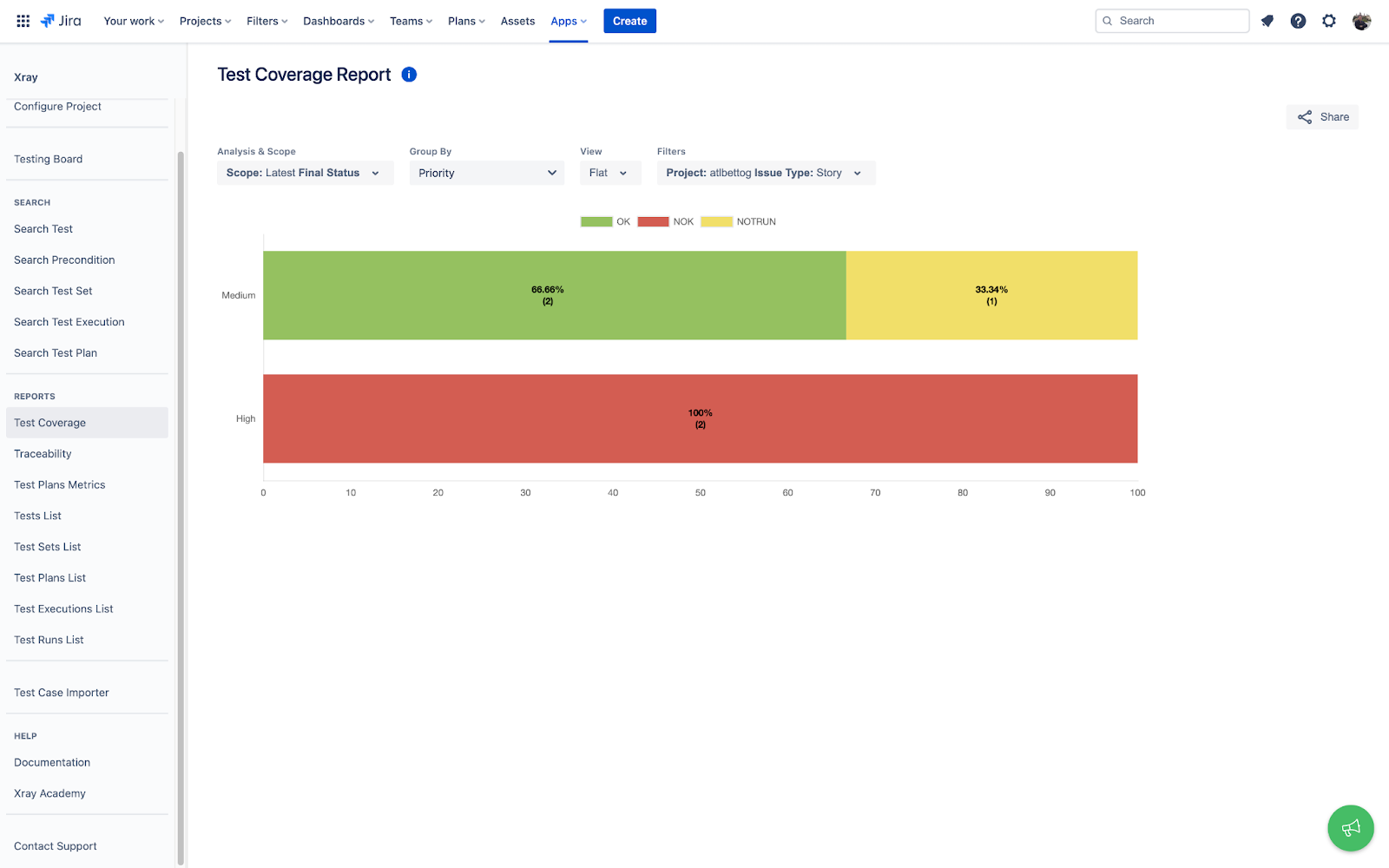
Xray's Test Coverage Report provides an overview of the test status
Teams often need to diagnose where an error is coming from when a test fails. Xray’s Traceability Report provides an analysis of all the issues covered by the tests and helps trace the connections between issues and the resulting impact. This is especially useful for highly regulated industries that require traceability to comply with regulations. Xray helps software teams gain better visibility, traceability, and control during their testing process.
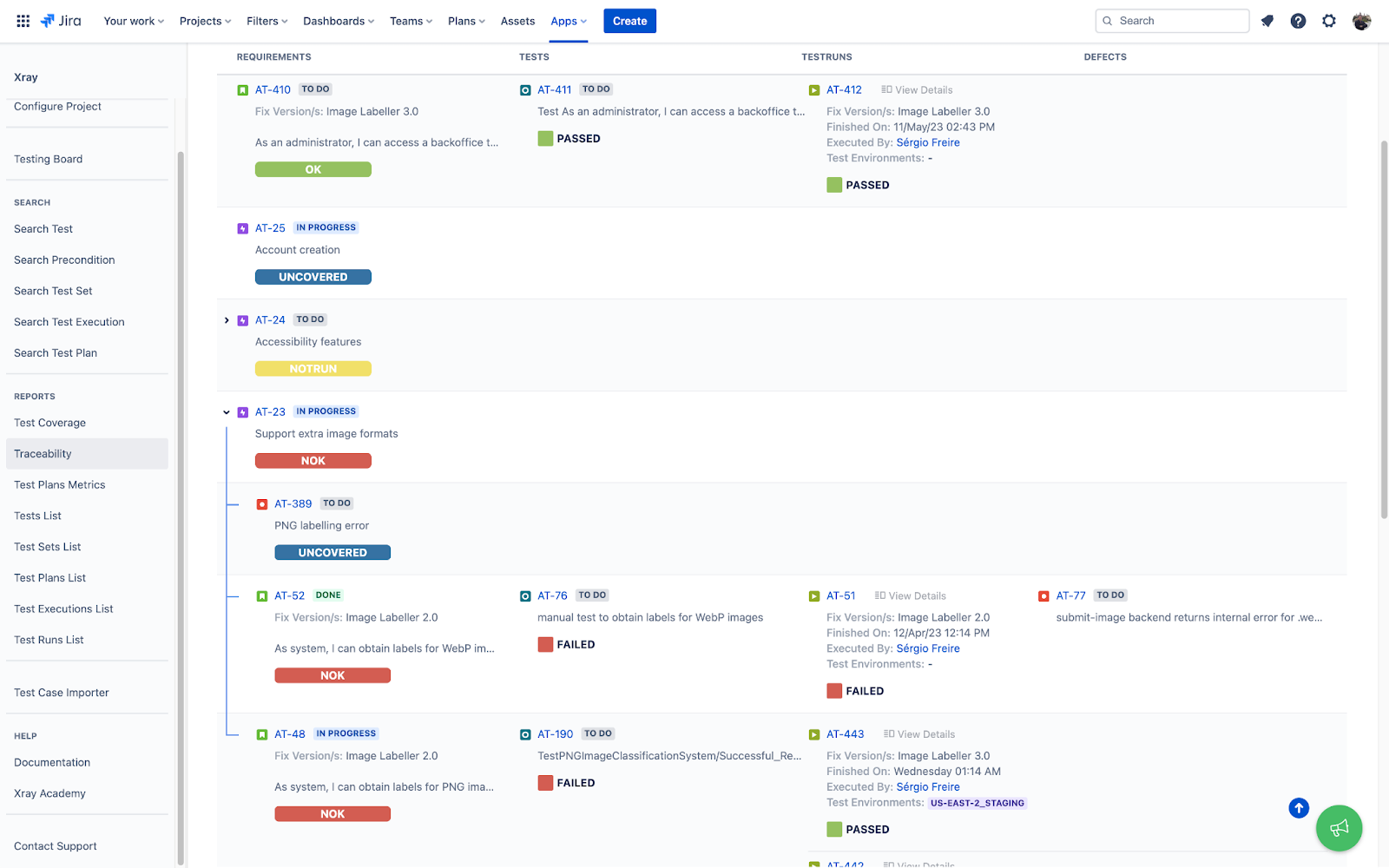
Use Xray's Traceability Report to uncover any errors found in the tests
Test Management right from Jira with Zephyr
Zephyr has two top test management tools in the Atlassian marketplace: Zephyr Scale and Zephyr Squad. Both help teams get end-to-end visibility of their test management, foster tighter collaboration, and enable faster releases. Zephyr Scale is a powerful solution with test planning, reporting, and reusability for teams across multiple projects. Zephyr Squad is perfect for small agile teams getting started with test management. In this blog post, we will use Zephyr Scale and the example to showcase how software teams can use Zephyr to improve visibility and collaboration during testing.
Zephyr Scale is scalable, performant test management inside Jira. It offers cross-project hierarchical test libraries, parameters, and test data—reducing redundancy and promoting reusability. Create and manage your test cases in the Zephyr Scale test case library, with over 70 cross-project reports, 60 gadgets, and 60 Confluence macros. Organize the test cases in folders, cloning, and exporting test cases in different formats (CSV, XML). Group the test cases by component, domain, or product, so teams can easily see all the tests in one place and customize the view they want to see to increase efficiencies.
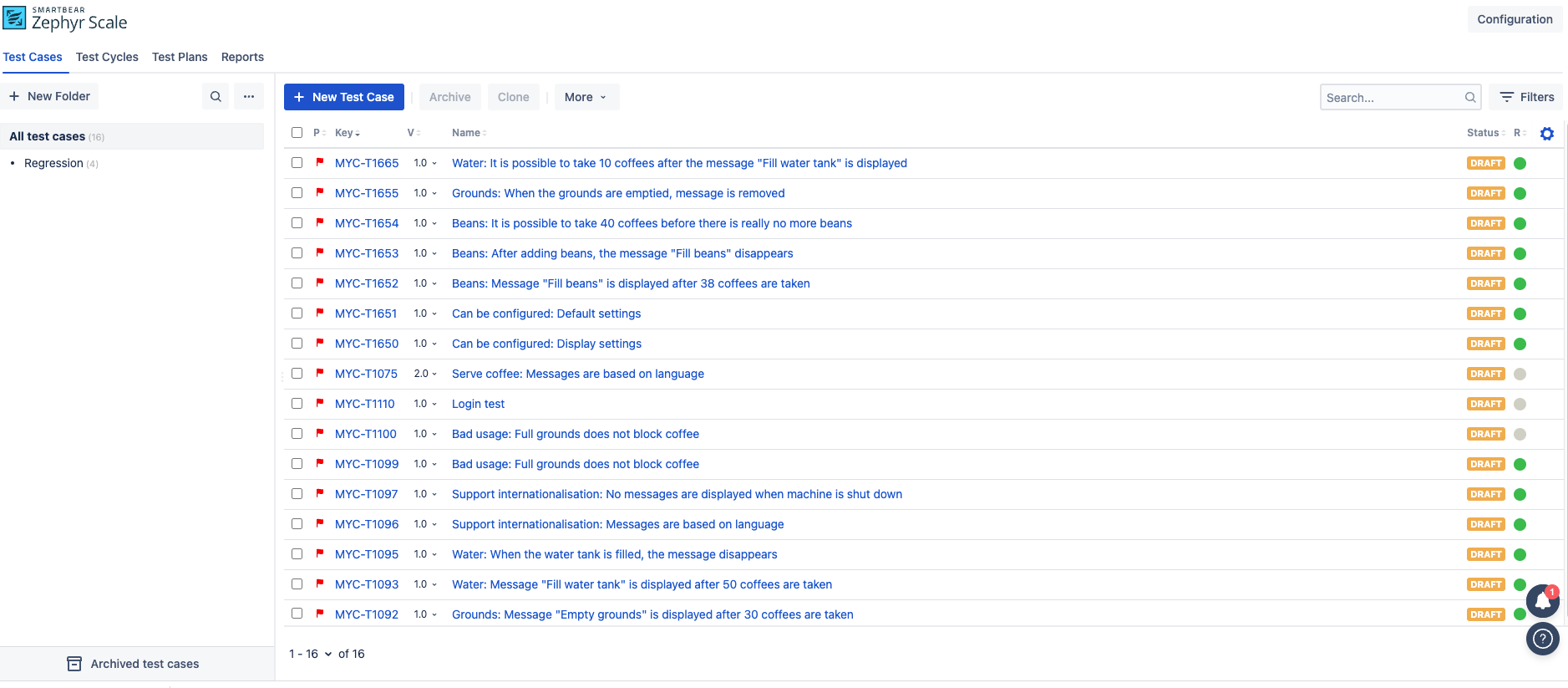
Create and manage your test cases in the Zephyr Scale test case library
Zephyr Scale enables end-to-end traceability within Jira, linking test cases to user stories and allowing single test execution from the issue screen. Use the Zephyr test player to record the execution of your test. You can assign statuses and set additional properties to this execution to record as much data as needed. Add attachments or raise issues such as defects found during testing in the format of Jira issues, so your dev team can easily plan and fix the defect in Jira.
Use the Zephyr test player to record the execution of your test
The following screenshot is one example of the multiple reports we have available in Zephyr Scale. Teams can quickly get an overview of their testing by creating reports and filtering based on various criteria such as test cases and test cycles to assess the release readiness of your product.
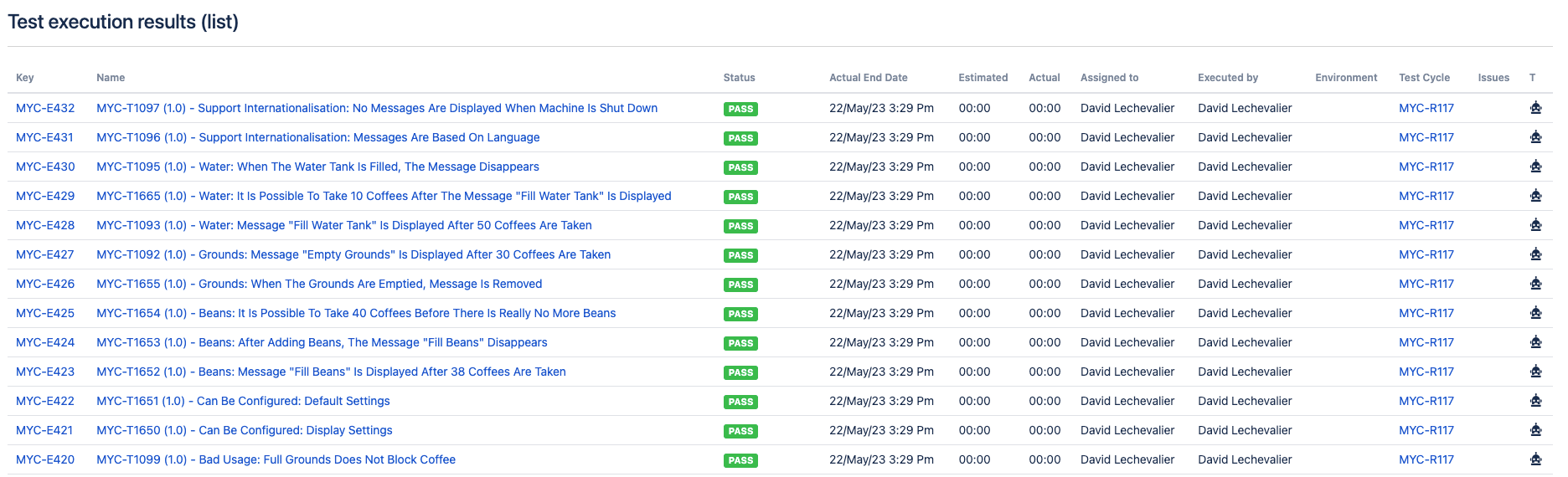
Easily create test reports and filter based on various criteria in Zephyr Scale
Zephyr Scale also has a reusability feature named "call to test". This feature allows teams to reuse the current test case from another test case created in the past and easily customize new parameters. This is useful to keep your test case library consistent when you want to repeat some steps. Zephyr Scale simplifies testing at scale, driving alignment and empowering teams to deliver high-quality software.
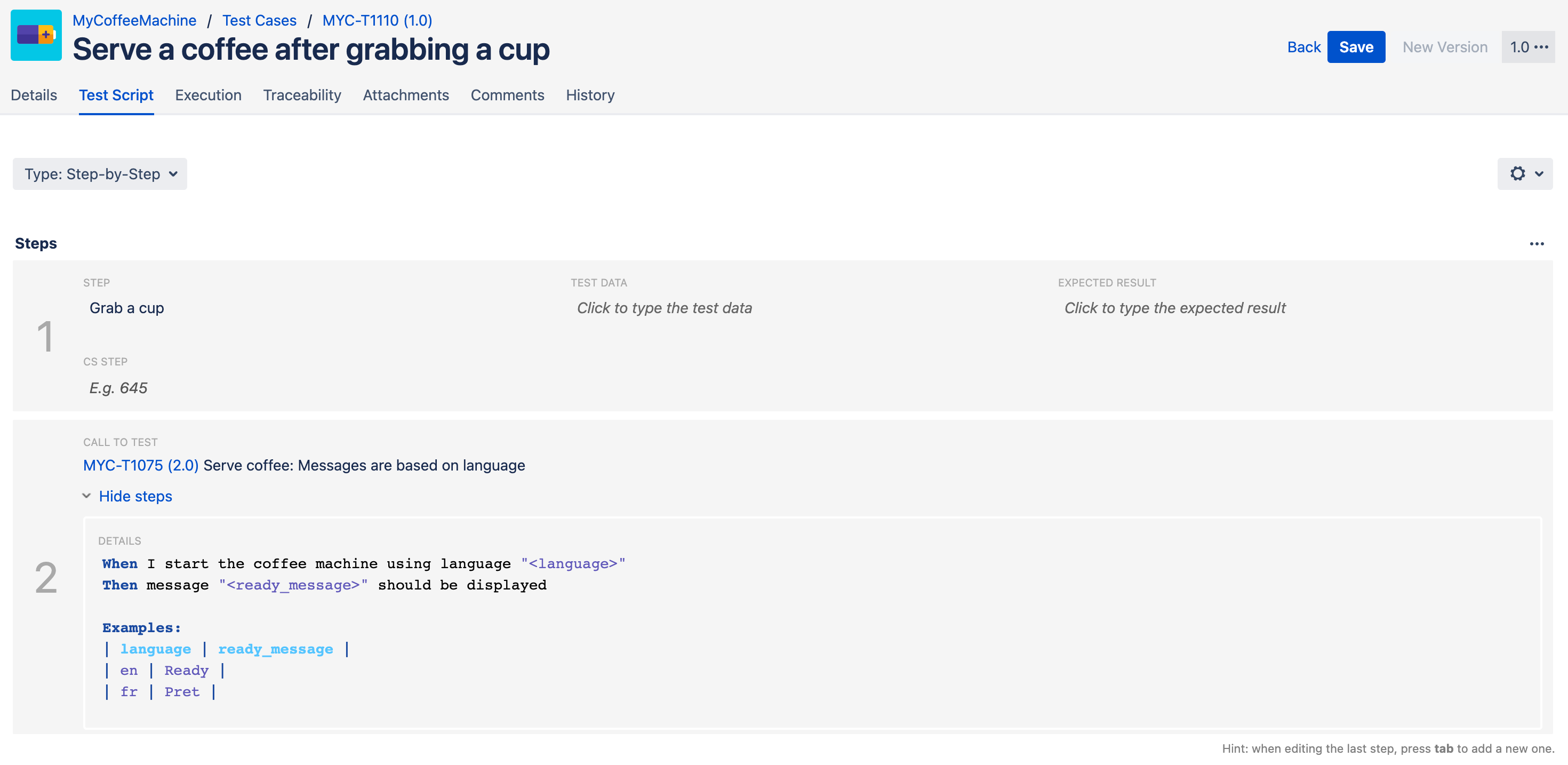
 Easily reuse repeatable test suites and customize parameters in Zephyr Scale
Jira Software as the consolidated single source-of-truth
Integrating test management tools like Xray and Zephyr with Jira Software can greatly improve software team's efficiency, collaboration, and overall testing process. By centralizing your test management activities, enhancing traceability, and providing powerful reporting and analytics, these integrations can help you maintain high-quality software development standards and ensure the success of your projects.
Explore the possibilities and benefits of integrating Xray and Zephyr with your Jira Software instance to streamline your test management processes and elevate your team's performance.
What are some of your experiences or pain points with test management? Let us know in the comments and happy testing!




![Photo of Jarosław Solecki [Deviniti]](https://us.v-cdn.net/6038660/uploads/avatars/59/c2/n59c2bb1bba82ab8589a6051c68eb349c.png)


