Hi,
Issue:
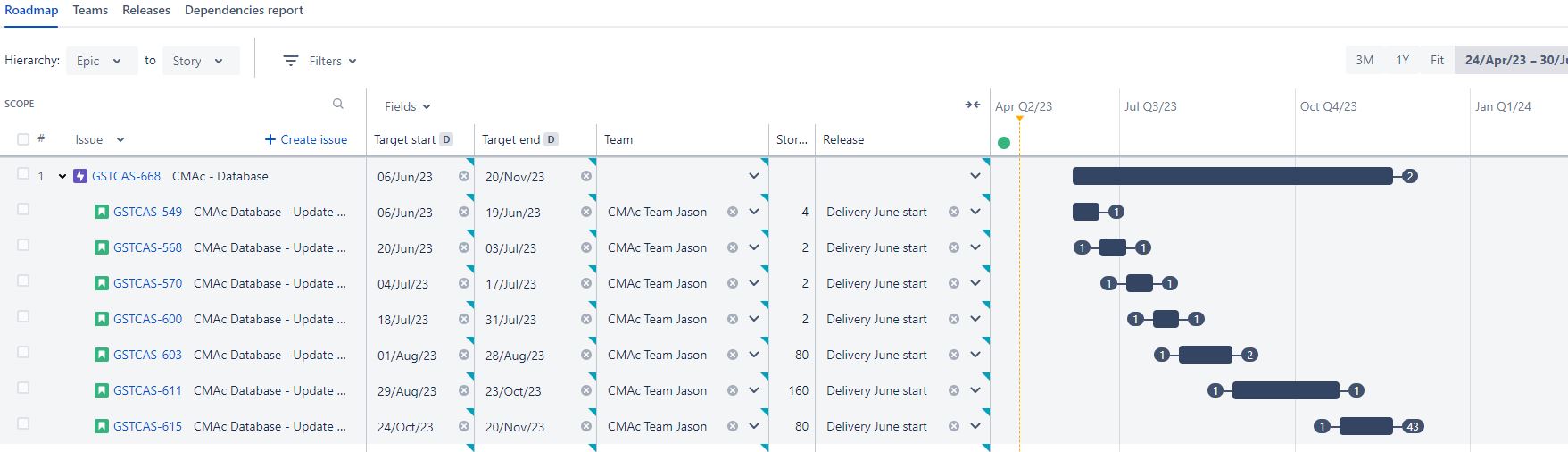
Auto-schedule has placed 4 small issues in separate projected sprints that could be completed in a single sprint. The PM wants the 4 issues to be in the same sprint.
Background:
I have Team Jason with a velocity of 40 story points per 2 week sprint.
The first 4 stories are all assigned to Team Jason, sequentially dependent on each other with story points of 4, 2, 2 & 2, giving a total estimate of 10 story points.
The release is set to start at the beginning of June with no fixed end date.
All target start and end dates are cleared.
Outcome:
When I select Auto-schedule, each story is placed in a separate 'projected sprint'.
Expected outcome:
As the capacity of the team per sprint (40) is well over the estimated story points (10), I thought that all 4 issues would be placed in the same sprint.
Queries:
- Why are they not placed in the same sprint?
- Is there a something I am missing?
- Can I get auto-schedule to place these stories in the same sprint?
- If not, what is a work-around? (I do not want to manually schedule all issues into sprints for the plan)
Addendum:
When I manually set target start and target end dates to be sequential within the same sprint (i.e. doing an issue per day), auto-schedule still puts them into separate 2 week sprints, even if they are not selected to be auto-scheduled !!
When I manually change the target start and target end dates to be in the same projected sprint, I get dependency alerts with lead time.


