Hello there,
As you know, Jira exports issues to CSV (all fields) all associated custom fields, even if they are empty. So, when you import this CSV Jira also asks you to fill in mapping a lot of unnecessary custom fields.
There is a short VBA script for Excel to delete all empty columns.
Sub DeleteEmptyCol()
  Dim rng As Range
  Dim backupHeader As Variant
  Dim inputRng As Range
  'Select all cells in the worksheet
  Set inputRng = Range("A1").CurrentRegion
  Application.ScreenUpdating = False
  'Go through columns
  For i = inputRng.Columns.Count To 1 Step -1
    'Remember the current header name
    backupHeader = inputRng.Cells(1, i).Value
    'Remove the current header, if necessary we return it back later
    inputRng.Cells(1, i).Clear
    Set rng = inputRng.Cells(1, i).EntireColumn
    If Application.WorksheetFunction.CountA(rng) = 0 Then
      'delete column if all cells are empty
      'Debug.Print "Delete " + backupHeader
      rng.Delete
    Else
      'return header back if column contains data
      'Debug.Print "Return " + backupHeader
      inputRng.Cells(1, i).Value = backupHeader
    End If
  Next
  Application.ScreenUpdating = True
End Sub
How-to:
- Export issues to CSV
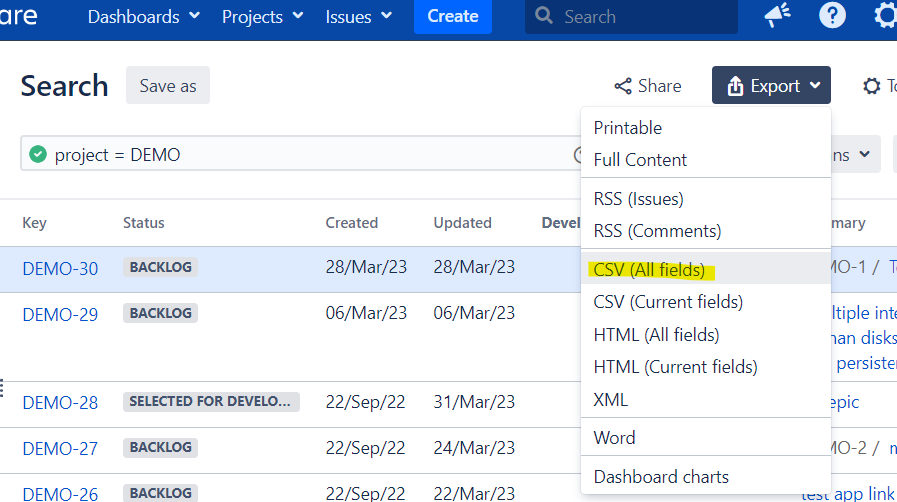
- Open exported CSV file in Excel. Please note, that in some cases Excel can't open a CSV correctly. In that case you can try import data from the CSV and copy header names.
- Press alt+F11
- In the opened window click 'Insert' -> 'Module'
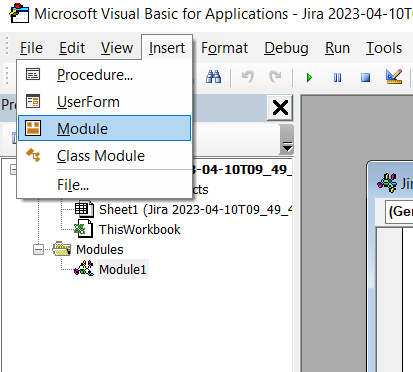
- In the window paste the code
- Press F5
- The script should remove all empty columns
I hope this will be helpful.
Regards,
Andrey

