Have you ever wanted to create tabs on your page? Well, of course you have! Tabs are a great way of organizing a page to keep it looking uncluttered. Below are two user macros you can create that will give you the ability to put tabs on your Confluence pages.
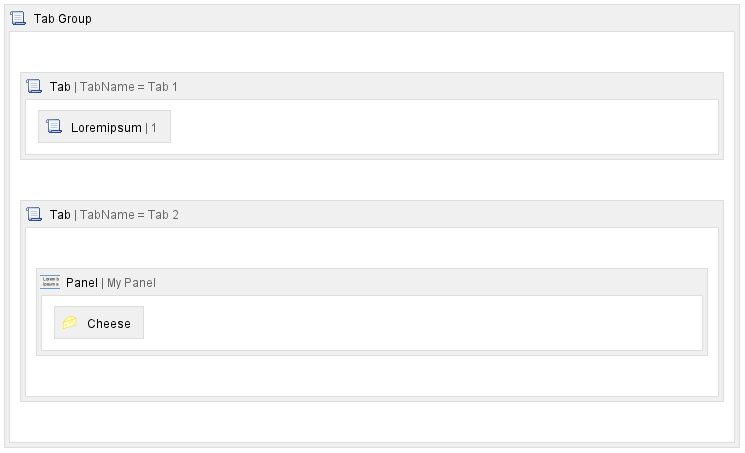
How it looks in the editor
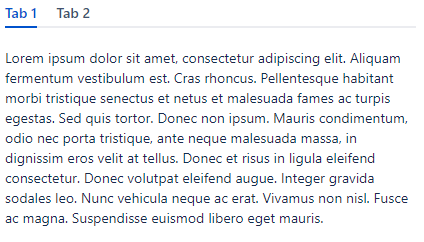
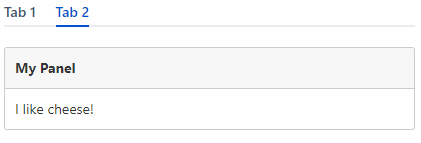
How it looks when viewing the page
The User Macro Code
Macro Name:
tab_group
Macro Title:
Tab Group
Description:
This macro is used with the Tab macro. It controls the tab direction and responsiveness of the tab macros within it.
Macro Body Processing:
Rendered
Template:
## Developed by: Davin Studer
## Date created: 03/31/2022
## @param Vertical:title=Vertical Orientation|type=boolean|desc=Display the tabs vertically vs horizontally.|default=false
## @param Responsive:title=Responsive|type=boolean|desc=If checked tabs that overrun the width of the screen will be placed inside a menu.|default=false

##############################
## Create a unique id value ##
##############################
#set( $id=$action.dateFormatter.calendar.timeInMillis )

###########################################################################
## These are used for getting around velocity issues when writing jQuery ##
###########################################################################
#set( $d = '$' )
#set( $p = '#' )

#if ( $paramVertical == true )
    #set( $direction = "vertical-tabs" )
#else
    #set( $direction = "horizontal-tabs" )
#end

#if ( $paramResponsive == true )
    #set( $responsive = ' data-aui-responsive="true"' )
#else
    #set( $responsive = "" )
#end

<div id="tabGroup$id" class="aui-tabs $direction"$responsive>
<ul class="tabs-menu"> </ul>
$!body
</div>

<script type="text/javascript">
    AJS.toInit(function(){
        var html$id = '';
        //Only one active tab
        if(AJS.${d}('#tabGroup$id > .tabs-pane.active-pane').length > 1 || AJS.${d}('#tabGroup$id > .tabs-pane.active-pane').length == 0) {
            AJS.${d}('#tabGroup$id > .tabs-pane.active-pane').removeClass('active-pane');
            var firstTab$id = AJS.${d}('#tabGroup$id > .tabs-pane').get(0);
            AJS.${d}(firstTab$id).addClass('active-pane');
        }

        AJS.${d}('#tabGroup$id > .tabs-pane').each(function(index) {
            var active$id = '';

            if(AJS.${d}(this).hasClass('active-pane')) {
                active$id = ' active-tab';
            }
            html$id += '<li class="menu-item' + active$id + '"><a href="#' + AJS.${d}(this).attr('id') + '" id="aui-tab-uid-' + AJS.${d}(this).attr('id') + '" class="tabs-menu-anchor"><strong>' + AJS.${d}(this).attr('data-tab-name') + '</strong></a></li>';
        });

        AJS.${d}('#tabGroup$id > .tabs-menu').append(html$id);

        AJS.tabs.setup();

        // Prevent scrolling the page to the tab
        AJS.${d}(".tabs-menu-anchor").click(function(e){
            AJS.tabs.change(AJS.${d}(this), e)
            e.preventDefault()
            e.stopImmediatePropagation();
        });
    });
</script>
Macro Name:
tab
Macro Title:
Tab
Description:
This macro is used with the Tab Group macro. Place one or more of these inside a Tab Group macro to create tabs on your page.
Macro Body Processing:
Rendered
Template:
## Developed by: Davin Studer
## Date created: 03/31/2022
## @param TabName:title=Tab Name|type=string|required=true|desc=Specify a name for this tab.
## @param TabID:title=Tab ID|type=string|required=false|desc=Specify a id for this tab. (optional)
## @param Active:title=Active|type=boolean|desc=Only one tab may be the active one. (optional)|default=false

##############################
## Create a unique id value ##
##############################
#set( $id=$action.dateFormatter.calendar.timeInMillis )

#if ( $paramActive == true )
    #set( $active = " active-pane" )
#else
    #set( $active = "" )
#end

#if ( $paramTabID && $paramTabID != "" )
    #set( $tabID = "tab_$paramTabID" )
#else
    #set( $tabID = "tab_$id" )
#end

<div class="tabs-pane$!active" id="$tabID" data-tab-name="$!paramTabName">
$!body
</div>


