Hey guys,
I am new to docker container and bamboo. And I am trying to use them to build my FPGA project.
Until recently I was using LXC container with bamboo and everything worked. Now I want to use docker container instead.
The configuration of docker is shown in the following figure:
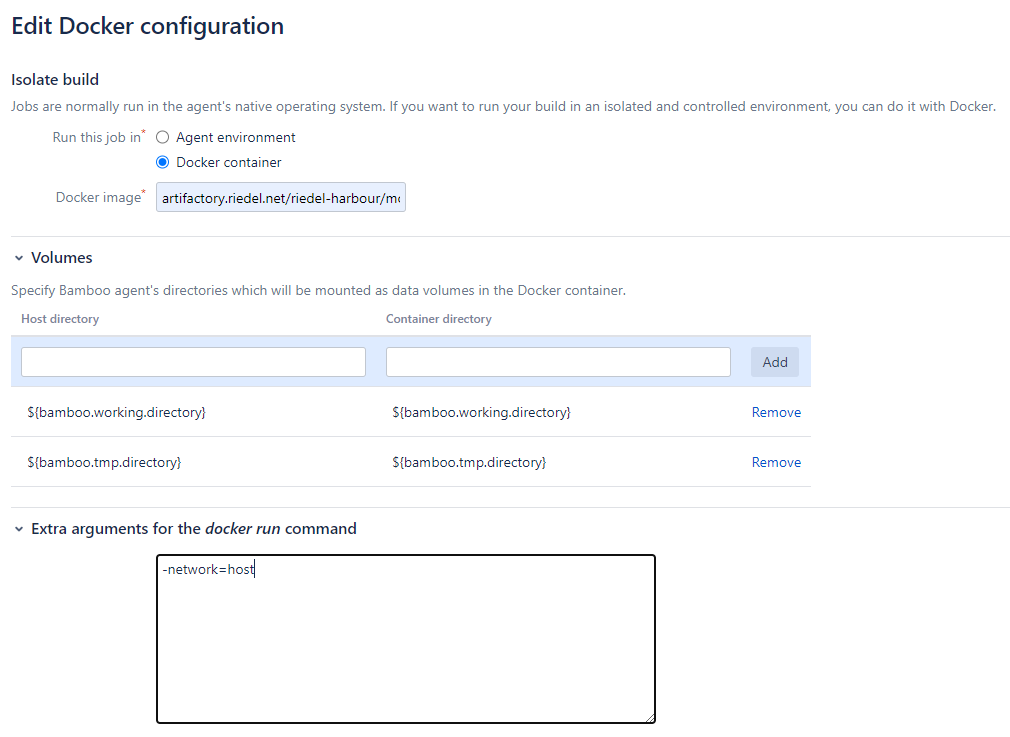
It seems that docker run has mounted the correct volumes:

My FPGA project source files are also successfully checked out:

In order to make sure that it is the correct directory I have added a "pwd" command in a script task and it showed the correct directory:

Now it should compile the FPGA project using a script in the working directory, which is shown above. But it complains that the script is not to be found.

I think the working directory is somehow not correctly mounted and I have found this page about this issue: https://confluence.atlassian.com/bamkb/bamboo-in-docker-build-fails-due-to-a-missing-working-directory-when-using-docker-runner-1027119339.html
Since I am using absolute host path volume mounting, I think the first solution mentioned in the page may be suitable.
- stop container
- create a host path identical to Bamboo home path, for example
<span>/opt/atlassian-bamboo/agent-home</span> - copy Bamboo home to a newly created directory (for example from
/root/bamboo-volume to /opt/atlassian-bamboo/agent-home) - start Bamboo server (agent) container with a new volume mount binding:
-v /opt/atlassian-bamboo/agent-home:/opt/atlassian-bamboo/agent-home
But I don't know how to do the steps in bamboo job configurator based on web browser. Can anyone give me some tipps?
Li
