Hey everyone! 👋
Firstly, did you know that you can reply to emails directly from Trello? With the Email for Trello Power-Up, new emails arrive as Trello cards so the whole team can get stuck in. Secondly, you can even use automation to reply! 🤯 This can be based on any trigger, whether that’s completing a checklist, adding a label, or moving a card.
Power through your inbox without lifting a finger! Here’s how:
- Create a Saved Reply. This is your email template for dealing with common queries. Include variables to make it personal and relevant to your customer.
- Create a Butler rule to send your Saved Reply. In this example, Pet Cuts salon sends their customer an email when a card is moved to their ‘Done’ list.
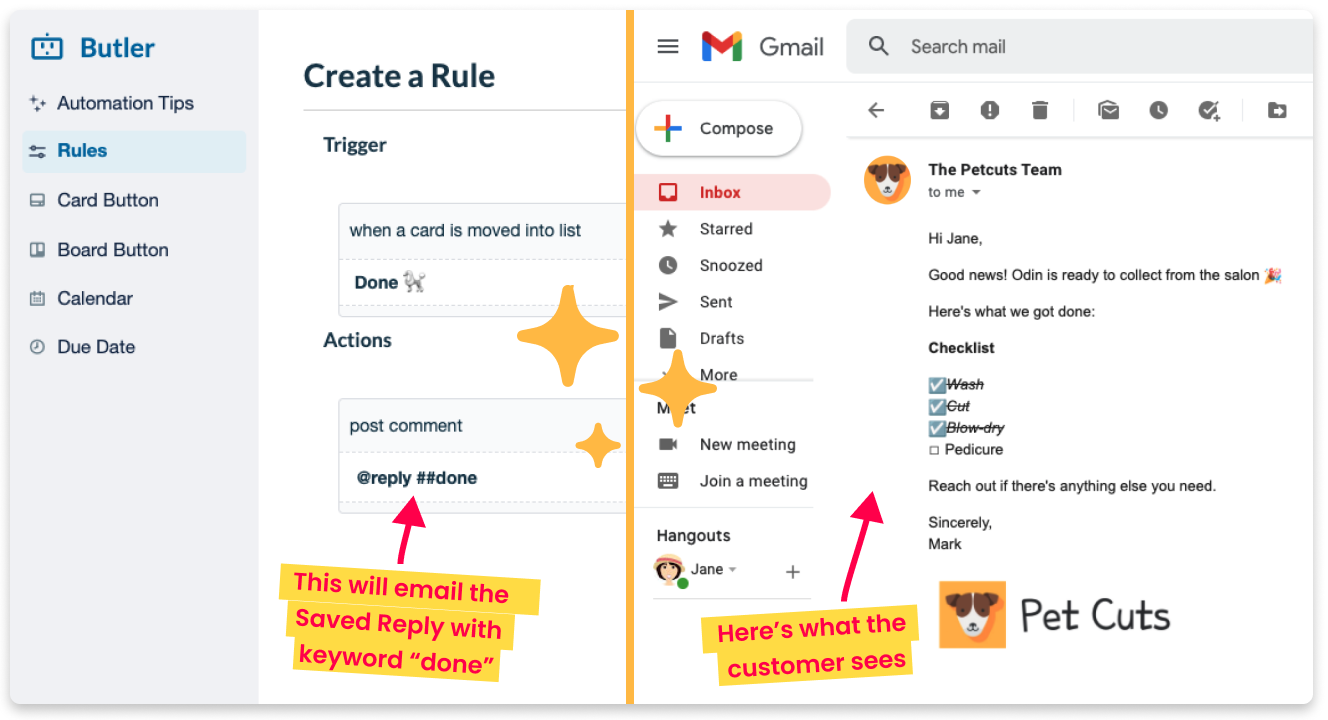
You’re all set!🎉 Let automation take the work out of email, so that your team can focus on the important stuff.


![Photo of Tinker Fadoua - [Seibert US]](https://us.v-cdn.net/6038660/uploads/avatars/5b/65/n5b65463c12c8288c531566164240215b.png)

