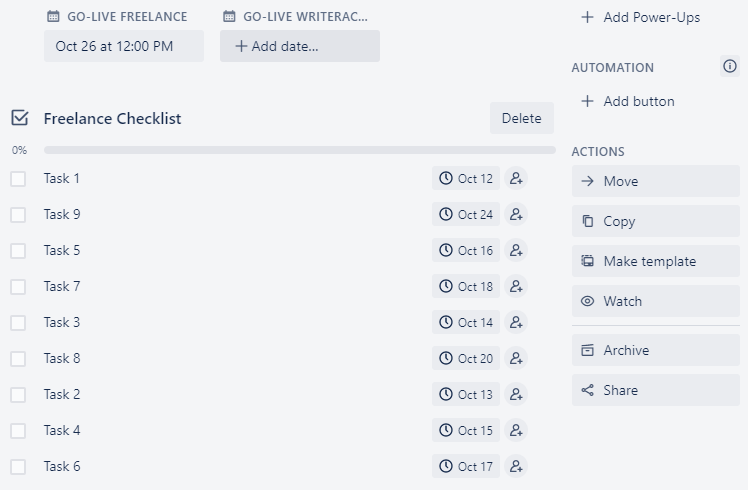
Hello, we have a custom field named "Go-Live" which is the launch date. I've added 9 automation rules based on this go-live date to create items in a checklist. The items within the checklist are in chronological order (i.e. Task 1 is due 14 days before go-live, Task 2 is due 13 days before go-live etc).
However, when this checklist populates, the tasks are not in chronological order and I'm unable to find a rule to help me do this. Please see sample automation rule below:
when custom field "Go-Live Freelance" is set by anyone, add item "Task 1" to checklist "Freelance Checklist", and set the item due on the date in custom field "Go-Live Freelance" minus 14 days
I've repeated this automation rule for all the items in the checklist with different dates.
In the below screenshot, you can see Oct 26 as the go-live date that was selected but all the tasks underneath aren't in order according to the dates.
Does anyone know of a rule that could help solve this?


