Hello everyone! 😃
Following up on my colleague @Jonny Carter's blog post about how to use ScriptRunner to bulk update content contained within Confluence pages, I figured I should come back and write about a feature we recently released in ScriptRunner that makes bulk updating macros incredibly easy.
We spent a significant amount of time developing this with the hope that it will save you the hassle and time required to manually edit pages. 😃
Script overview
In a large Confluence instance where a macro is used hundreds of times across many pages, Update Macro helps Confluence admins to:
- Save hours of work by adjusting macro parameters and macro content in bulk instead of having to manually edit each appearance
- Keep things consistent by ensuring information is displayed and surfaced for reporting in the same way across various macros
Update Macro works on native Confluence macros and third-party macros alike. It is simple to use and doesn’t require any scripting, but there is an option for scripting if needed.
Our script is a potential answer to the feature request Atlassian has open that describes user's desire to easily update or change many macros at once.
Basic usage of the script
Update Macro was initially released in version 6.22.0 of ScriptRunner and then enhanced in version 6.25.0. So, you'll need to be on version 6.22.0 at the minimum.
Once you've installed a version of ScriptRunner which has the Update Macro script, you can simply locate it by visiting the Built-in Scripts page within ScriptRunner.
After clicking on the script, you'll see several fields.
Enter a CQL Query to find pages or blogs where you want the macro updates to take place.
- Use the Macro dropdown to select the macro you want to work with.
Once you select a macro, the Macro Parameter(s) field appears. In Macro Parameter(s), add which parameters you want to update.
When you select your parameters, the corresponding fields appear.
- Enter your new parameter values in these fields.
You do not need to enter a Code Transform - it is optional. You could also skip Step 3 above and just enter a transform.
For example, you'd get the following fields if you selected parameters for the Confluence's Blog Posts macro:
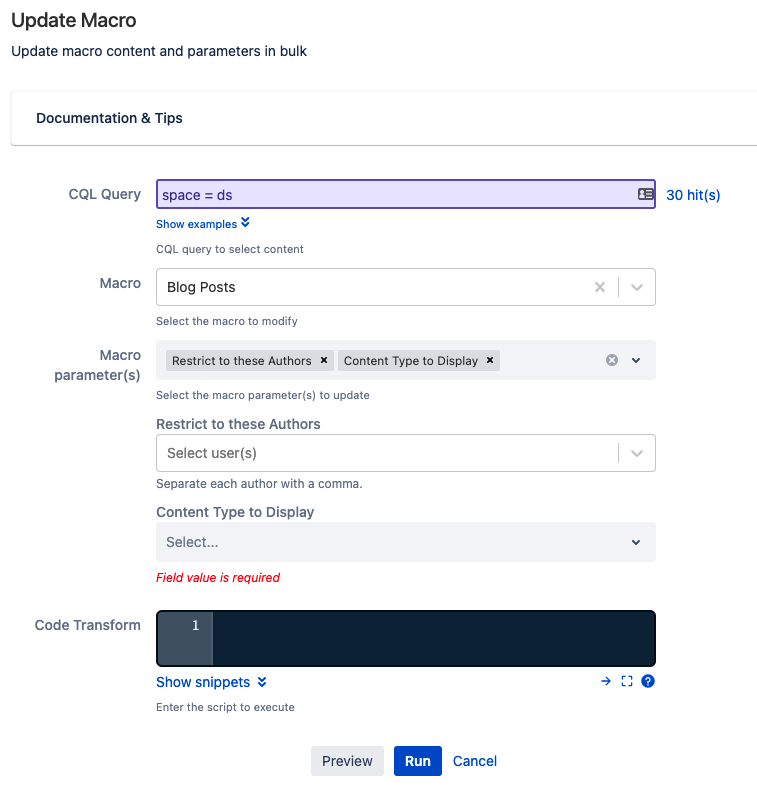
We have developed this script so that users get dynamically generated fields that make sense in relation to the macro parameters that are selected. For example: the Restrict to these Authors parameter for the Blog Posts macro will generate a User Picker field, because you'll need to select users.
Simply click Run after filling in the fields and all found macros will now be updated! 🎉 🎉
Documented examples


