I am trying to use the Dynamic Content fields in Power Automate (PA) available for Trello. I don't see anything for Custom Fields at all. Help on this would be much appreciated, as I need to refresh a dB nightly with all Custom Field data.
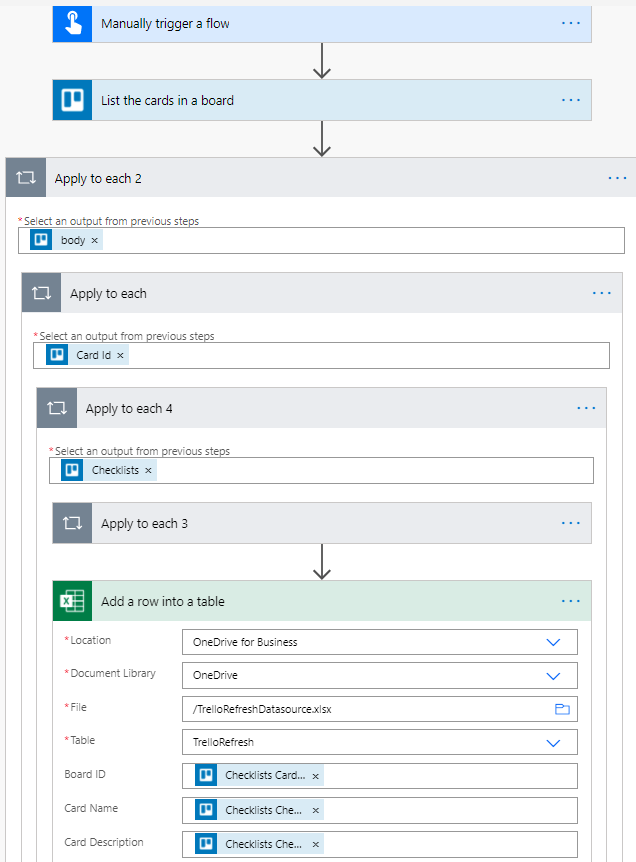
The second issue are Checklists, and I'm sure it's me doing something wrong. In PA the use of the Control action: Apply To Each is used like a For Next Loop. I'm trying to use the Apply To Each in this order as a nested loop of sorts, starting with the Trello option in PA "List The Cards in a Board".
- for each Card ID,
- for each Checklists
- adding the following records to an Excel sheet (just for testing purposed) :
- Checklists Card ID
- Checklists Checklist ID
- Checklists Checklist Name
Here is the error I'm getting in PA:
The execution of template action 'Apply_to_each' failed: the result of the evaluation of 'foreach' expression '@items('Apply_to_each_2')?['id']' is of type 'String'. The result must be a valid array.
A screen shot of the MS Flow I'm using is below
(and please disregard the field names to left of the Trello dynamic content fields ... those are irrelevant).
Thank you for any help you might provide for finding Custom Fields and helping me figure out why looping properly.
Jim