The problem:
I work with windows 10 on a 64 bit system.
My machine broke down. At work, I was assigned to another machine that was previously used by another employee who left. That being the case, it becomes impossible for me to fetch or clone a repository.
The message I receive is:
remote: Invalid username or password
fatal: Authentication failed for 'https: //Me@bitbucket.org/MyWorkSpace/MyRepo.git/'
There is another error that strikes me in the case of cloning a repository:
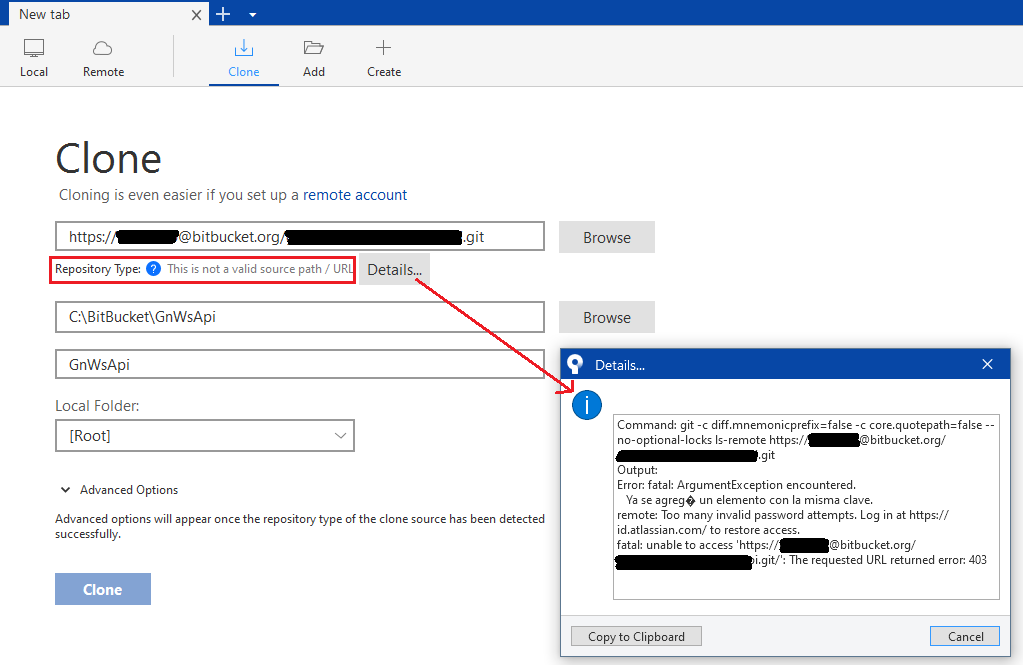
fatal: ArgumentException encountered.
An item with the same key has already been added. (english).
And finally a Remote button on the toolbar that includes an exclamation point, such as a warning.

If I press this button it redirects me to the bitbucket site, to the repository, but it never shows it.
What I can do:
I can go to the Bitbucket site, identify myself with my credentials (it's a corporate google account) and see all my workspaves and repositories without problems.
What I already did:
I have already uninstalled Bitbucket and cleaned all the git related files and folders that I found and reinstalled it again.
I have entered Tools-> Options -> Authentication and registered my user with both methods: OAuth and Basic and in both cases the authentication is ok. In the case of basic authentication I have generated a password on the Bitbucket site through Personal Settings -> App Passwords.
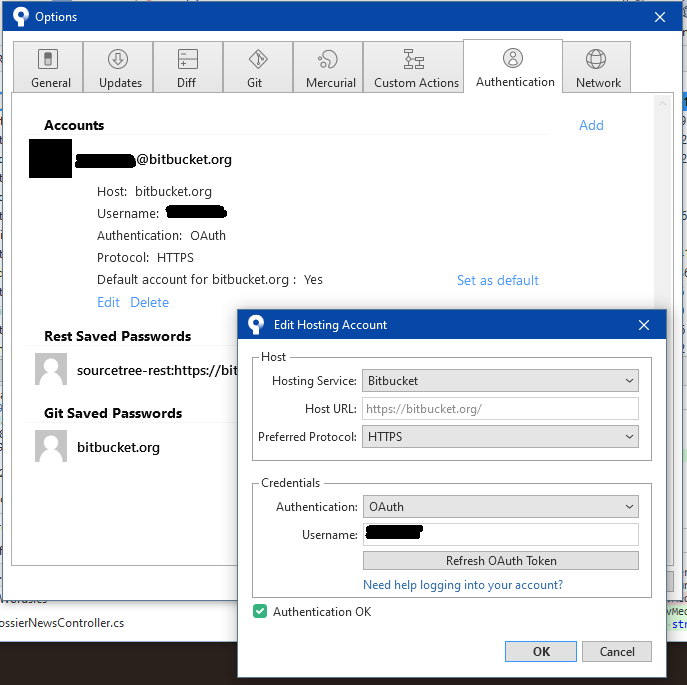
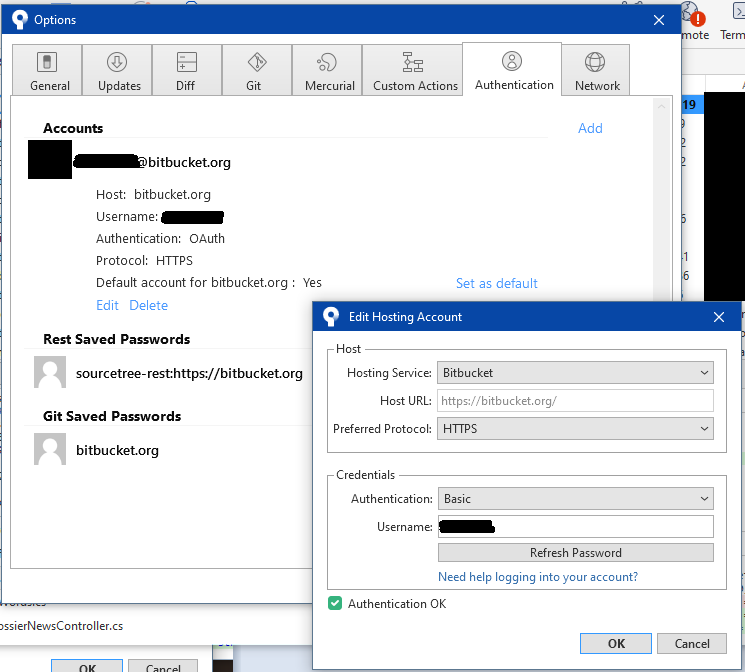
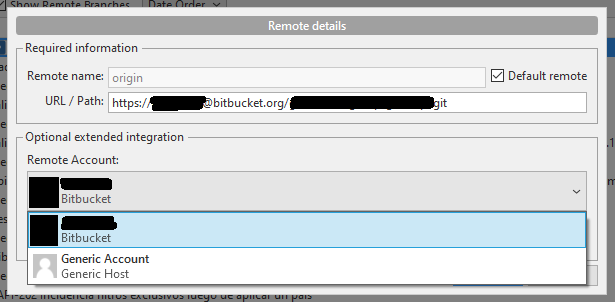
I have entered Repository -> Repository Settings and changed the Generic Account option to my own.
In fact I am already receiving one more message: Too many invalid password attemps.
I have executed by command line the user registration with Git Bash: git config to set the global user,
And I don't understand what I'm doing wrong, or where to set this password. I really am lost with this.
Any help is welcome.
Thanks so much for reading.
UPDATE:
I can clone a repository using git bash:
git clone https://LuisCarro@bitbucket.org/gnloreal/tercerismo.git
Once done I open Sourcetree and add this repository I just cloned on my machine.
If I try a fetch with sourcetree it returns several errors:
git -c diff.mnemonicprefix=false -c core.quotepath=false --no-optional-locks fetch
originfatal: ArgumentException encountered.
An element with the same key has already been added.
remote: Invalid username or password
fatal: Authentication failed for 'https: //LuisCarro@bitbucket.org/gnloreal/tercerismo.git/'
In Repository-> Repository setting-> remotes-> origin, the remote account is set to 'LuisCarro'
In Tools-> Options-> General the default user informacion is set to my name and email
In Tools-> Options-> Authentication:
Hosting service: Bitbucket
Hots url: https://bitbucket.org
Preferred Protocol: HTTPSAuthentication: OAuth
Username: LusiCarroIf I press the Refresh OAuth Token button a browser opens at http://localhost: 34106/?State=authenticated&code=blablabla.
but this page is not loaded, it returns ERR_CONNECTION_RESET.
However the Edit Hosting Account dialog shows "Authentication OK"
If I press Set as default, it shows a dialog that says: "are you sure to set 'LuisCarro' as the defalt username for use with bitbucket.org when no username is included in the DVCS url?" and i do not understand this.
Continuing with git bash, I can operate from here.
The same fetch (git -c diff.mnemonicprefix=false -c core.quotepath=false --no-optional-locks fetch origin) runs smoothly.
I can commit, push, pull request, etc. everything from git bash and with the same user that Sourcetree does not allow me to use.

