Forums

Articles
Create
cancel
Showing results for 
Search instead for 
Did you mean: 

Bulk Actions on Trello Cards

Screenshot 2026-03-09 at 10.39.07 AM.png

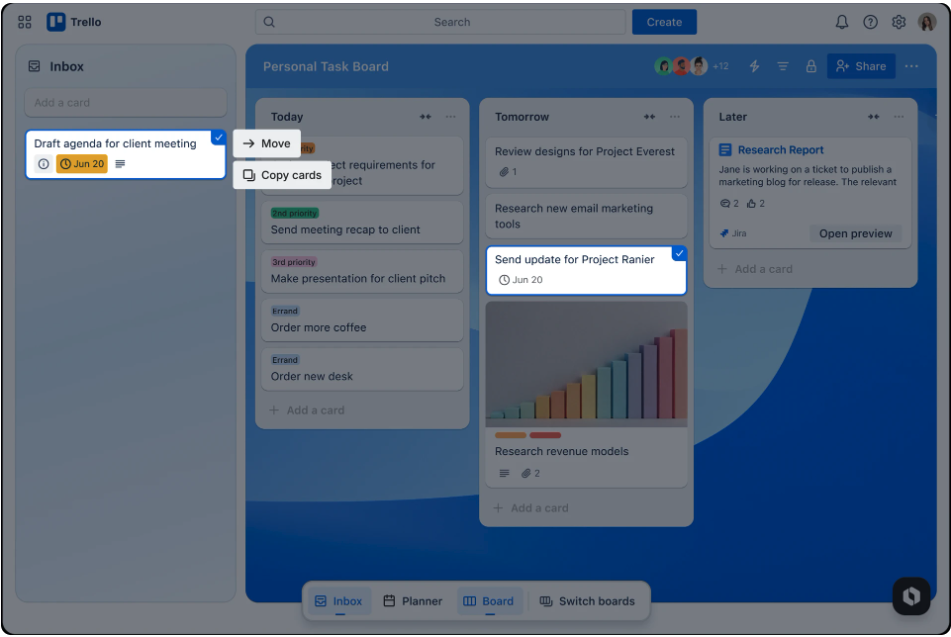
The option to bulk edit more than one Trello card at a time is something the Trello community has been requesting for years so we’re thrilled to share it’s now being released and will available for you to use as a built-in feature on web. Now you can select multiple cards (up to 20!) and move or copy them in one go. You can move or copy them to different boards within the same workspace or to the Trello Inbox. This feature allows you to bulk edit cards across both the Inbox and an active board.

Hold down the Shift key and click to select the cards you want, then right-click to see the menu options. Hit Escape to exit the multi-card selection and return to normal. Within a single list, you can hold down the Shift key, click on one card and then a lower card in that same list and the full range of cards will be selected—right-click any card within the range to access the bulk action menu. On Apple computers you can also use the Command key and click, and on Windows machines you can also use the Ctrl key and click. We are borrowing these shortcuts which you may be used to using to open a new tab. We apologize for the inconvenience and plan to replace that functionality in the coming months.

Our goal is to add more bulk actions in the future besides move and copy, so please comment below to let us know what would be most useful to you!

7 comments

Richard A Abel III
March 9, 2026

Hi Alex

Can you confirm if this feature is live or if users need to do anything enable it? This is not working for me. Running the latest version of google chrome + windows 11.

  • Shift + Left click = open card in new window
  • Ctrl + Left click = open card in new tab

"We are borrowing these shortcuts which you may be used to using to open a new tab. We apologize for the inconvenience and plan to replace that functionality in the coming months."

Do I need to turn off 'open a new tab' to ensure Trello can properly multi select?

Scott Stilson
Rising Star
Rising Star
Rising Stars are recognized for providing high-quality answers to other users. Rising Stars receive a certificate of achievement and are on the path to becoming Community Champions.
March 10, 2026

Also not working for me yet on Chrome Version 145.0.7632.160 (Official Build) (arm64) for 
macOS Tahoe—but that’s just as well because I really don’t want you to borrow cmd+click. 

Anyway, not why I'm writing. I'm writing to reply to your request for comment about which bulk action would be most useful to us. For us, that would be adding labels.

Alex
Atlassian Team
Atlassian Team members are employees working across the company in a wide variety of roles.
March 10, 2026

@Richard A Abel III @Scott Stilson - We are starting roll out this week so it may not be available yet for you. No need to turn anything on. 

Also, thanks @Scott Stilson for your suggestion on additional bulk actions. Editing labels is one we're considering!

Like Richard A Abel III likes this
Richard A Abel III
March 10, 2026

Thank you @Alex !

Alex G_
Rising Star
Rising Star
Rising Stars are recognized for providing high-quality answers to other users. Rising Stars receive a certificate of achievement and are on the path to becoming Community Champions.
March 10, 2026

@Scott Stilson While you are waiting for Trello to implement a native solution, our Bulk Actions Power-Up might be exactly what your team needs right now: 

Bulk Actions Power-Up 

Because we operate outside Trello's core UI, it works a little differently than a native tool, but the trade-off is that we offer significantly higher limits and address many more use cases. This is especially true if human error and the need for high confidence are a concern for your team.

With over 140,000 installations, we've been the go-to solution in the Trello ecosystem for years for tasks like:

- Moving and copying cards

- Changing labels

- Updating custom fields

...and much more.

We have a free tier available, so you can test it out today and see if it speeds up your workflow!

If you have any questions, feel free to contact us at support@bulkactionspu.com for personalized advice.

Hope this helps!


Richard A Abel III
March 11, 2026

Thank you @Alex , this new feature works on my account as of this morning!

Leona Dorothy
I'm New Here
I'm New Here
Those new to the Atlassian Community have posted less than three times. Give them a warm welcome!
March 17, 2026

Definitely would prefer a different option for bulk selecting of cards!  Not a feature I really need, and I've relied on Ctrl+Click to open in a new tab frequently, which is broken now.  Please restore the ability to open cards in a new tab ASAP, and maybe only use Shift+Click for bulk selecting or a different UI option, entirely, rather than breaking browser functions.

Comment

Log in or Sign up to comment
TAGS
AUG Leaders

Atlassian Community Events