The Atlassian Community Forums are currently in read-only mode. We will be relaunching on a new platform on September 22 (read more here). We apologize for the extended downtime. For concerns or questions, please email communitymanagers@atlassian.com. See you on the other side, on the new Atlassian Community Forums! :)

×

Forums

Articles
Create
cancel
Showing results for 
Search instead for 
Did you mean: 

Missing Sourcetree UI

Bawenang Rukmoko
I'm New Here
I'm New Here
Those new to the Atlassian Community have posted less than three times. Give them a warm welcome!
August 7, 2016

Hi guys,

I've updated my Sourcetree to the latest version of 1.9.6 and got so disappointed with it. Not only does the UI suck, but it's also faulty. Or at least in my place. Here's the screenshot:

derr.png


Now as you can see, the tick boxes in the "Staged files " in the old Sourcetree are all gone. And some of the top buttons are missing their label. Anybody know how to fix this?


PS: I'm on Windows 10, for that matter.
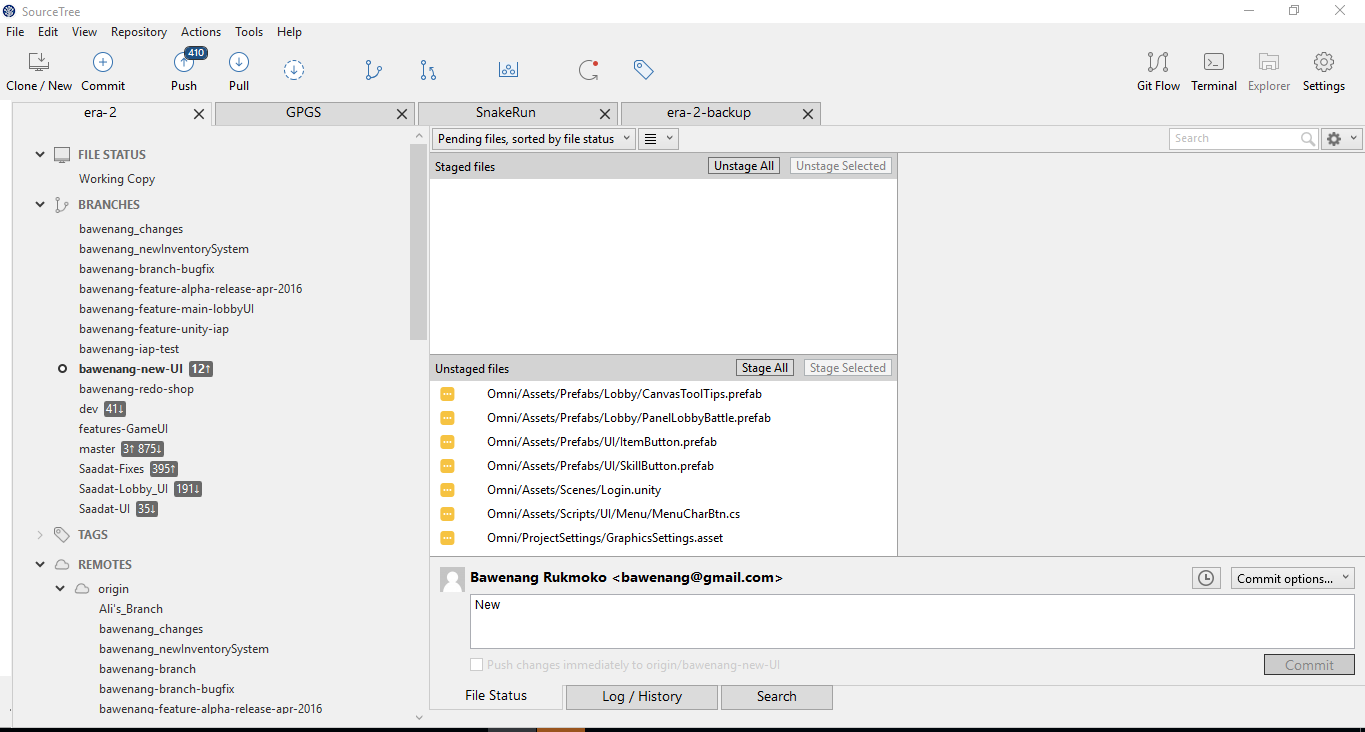


https://gyazo.com/dcc6437d04e875011c1afa241dc3423c

2 answers

Comments for this post are closed

Community moderators have prevented the ability to post new answers.

0 votes
Scott W
Contributor
August 8, 2016

Same here. An app restart fixed it for me.  But it's back again now.  I've got a DELL-XPS13.  I'm thinking Win10 and high DPI might be an issue.

Have yet to apply latest updates, I hear they're not so great.

0 votes
Rodney
Rising Star
Rising Star
Rising Stars are recognized for providing high-quality answers to other users. Rising Stars receive a certificate of achievement and are on the path to becoming Community Champions.
August 8, 2016

Try switching to "No staging" interface.  It's in the drop down list next  to the "Pending files"

TAGS
AUG Leaders

Atlassian Community Events