I am trying to connect to ADO, and for that I want to use a ssh key which is stored in a specific location, when I go to create an account I am facing two issues.
1. Why does sourcetree asks for a personal token if I am trying to use ssh key anyway?
2. Why there is no option to pick where my ssh key resides?
Maybe I am missing something that is obvious here...
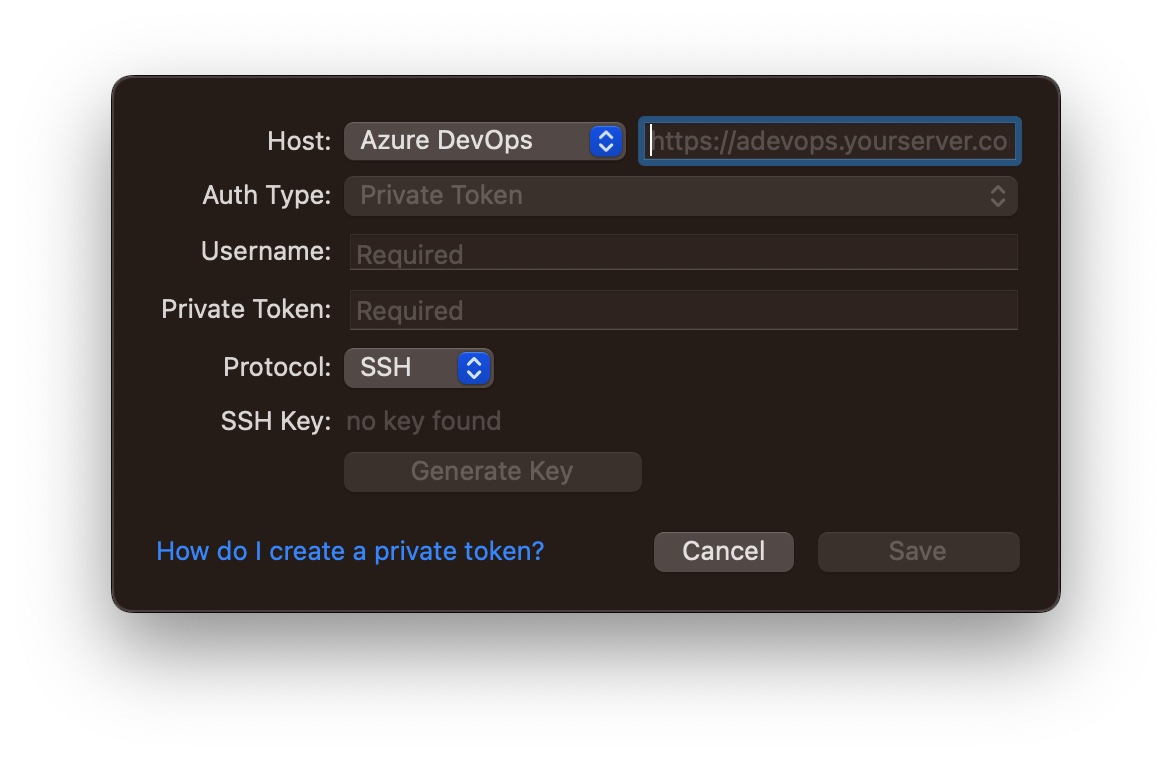
Question one: the two are separate. The account you add uses the Azure DevOps REST API for Sourcetree to list repositories and pull requests, which only accepts a personal access token. The Protocol and SSH Key fields relate to git transport when cloning. Both are needed, despite seeming redundant.
On question two: that dialog does not browse for a key. It reads from the SSH agent or the default location, which is why it says "no key found". I would not fight it. Point OpenSSH at your key instead, in ~/.ssh/config.
A common pitfall in Azure DevOps is that newer versions of OpenSSH might cause an RSA key to fail because of the signature algorithm. But don't worry—using an ed25519 key can easily sidestep this problem altogether.
Did you get this sorted, or is it still open on your side?
Cheers, Martin
You must be a registered user to add a comment. If you've already registered, sign in. Otherwise, register and sign in.