Hi everyone,
I’m Dmitry, a Product Manager on the Jira team building new features to help you scale your Jira instance while maintaining governance and standards.
We know that empowering your teams with the autonomy to move quickly is critical to your organization's success. But as your user base grows, you need proper guardrails in place to ensure teams stay aligned with your standards and ways of working.
I’m happy to announce a major step forward in supporting guided autonomy for teams - delegated space creation from custom templates is now available for all Jira Cloud Enterprise customers!
With this update, you can:
-
Unblock teams: Allow selected users and groups to safely create company‑managed and team‑managed spaces on their own.
-
Maintain consistency: Keep guardrails in place so new spaces stay aligned with your governance, compliance, and reporting standards.
-
Improve admin efficiency: Spend less time manually spinning up spaces for your users.
How to get started
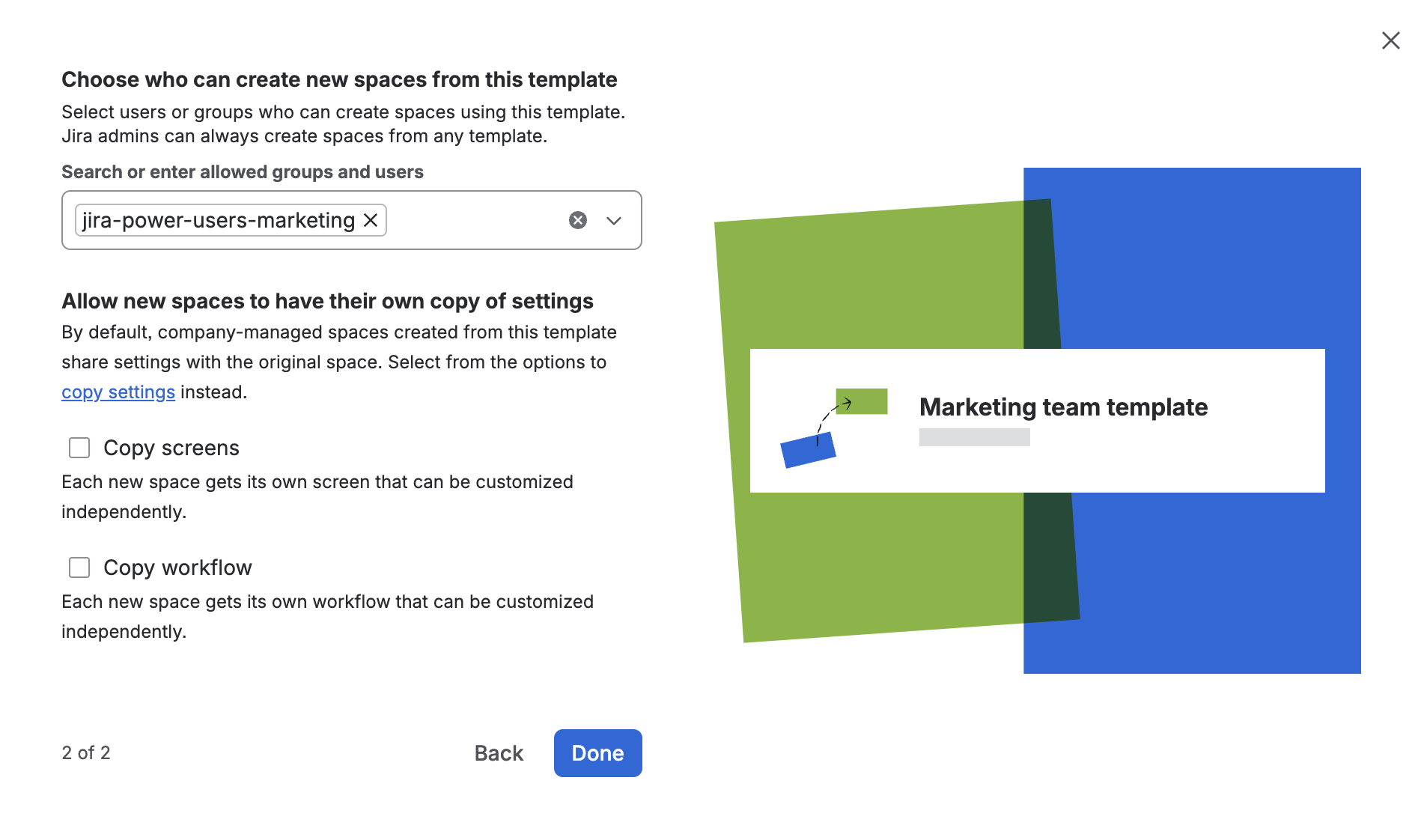
1. Set up your space template. Start by choosing or creating a space that represents your org's standards or best practices. Turn it into a custom template and delegate space creation:
-
Open the space you want to reuse as a template.
-
Click More actions (…) → Save as template (or Edit template if you have already created one).
-
In the configuration dialog, choose the users and groups who should be able to create spaces from this template (for example, a 'Power users' group or specific department leads).
-
Note for company-managed templates: All new spaces will share their configuration (workflows, fields and screens, permissions, etc.) with the original template space. You can also allow new spaces to have their own customizable copy of settings (and underlying schemes) by selecting the Copy screens or Copy workflows options.
After that, the selected users and groups will see this custom template in Space templates when they press the Create space button.
2. Configure permissions for the new spaces. For company-managed spaces, this new setting only allows users to create spaces from a template. Separately, you need to ensure they have the required permissions to access and configure the spaces they create.
Because all new company-managed spaces will share configurations with the original template space, you need to configure the permissions scheme for the space you saved as a template:
-
Open the permissions scheme for the company-managed space saved as a template.
-
Ensure the users or groups who can create a new space from the template also have the required space permissions. For example, they will need the Administer Projects permission to update space details, and the Browse Projects permission to view the space and its work items.
-
Pro-tip: Consider granting Manage Issue Layouts and Edit Workflows permissions to delegate other admin actions for new spaces. Use these in combination with the Copy screens and Copy workflows template settings to ensure the configuration is isolated.
What's next?
This release is only one of our first steps in supporting guided autonomy for teams by allowing Jira admins to granularly delegate administrative actions and define guardrails.
If you’d like to try this out in your organization, discuss how to apply it to your use case, or just share your feedback, please reach out to dmelikov@atlassian.com and we will schedule a call to chat!


