Hi, community!
Two new Jira tables are now available on Analytics App:
-
‘Work item sprint mapping’, under Jira schema
-
'Work item hierarchy', under Jira Family of Apps schema
Both tables are meant to simplify the current query logic if you need to report on Sprint<>Work item or Jira work item hierarchy. The new tables will be gradually rolled out in the coming week.
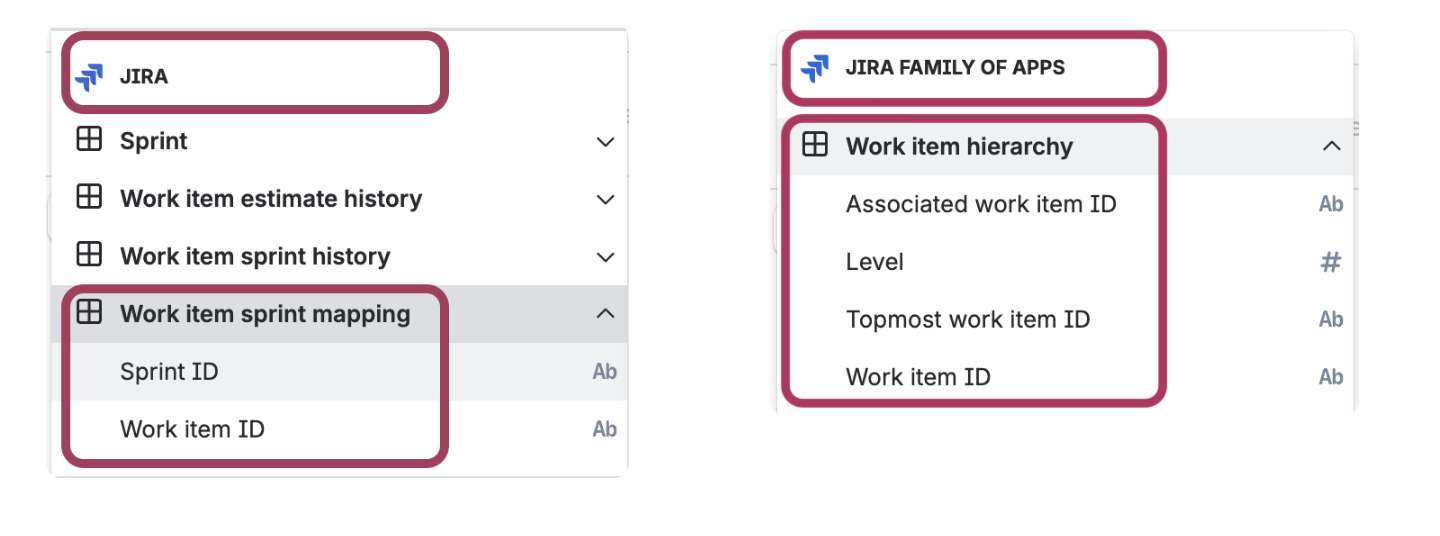
‘Work item sprint mapping' - is a 1:1 mapping between ‘Sprint ID’ and ‘Work item ID’ that shows the up-to-date Jira Sprint and Work Item mapping. You no longer need to route through ‘Work item sprint history’ table to join ‘Work item’ and 'Sprint’ tables for the mapping.
'Work item hierarchy' - offers a hierarchical view of Jira work items. It gives the flexibility to report from either the top-down or the bottom-up of the Jira work item hierarchy, without doing self joins. In other words, you’re able to get the higher-level work items associated with a particular work item or all the children of a top-level work item.
🎥 How to use 'Work item hierarchy' table
This video shows 2 use cases of ‘Work item hierarchy’ table. One is a straight way of listing out all descendents under one topmost work item. The other is manipulating ‘Work item hierarchy’ table to get laddering up hierarchy chain view.
Explanation on 'Work item hierarchy'
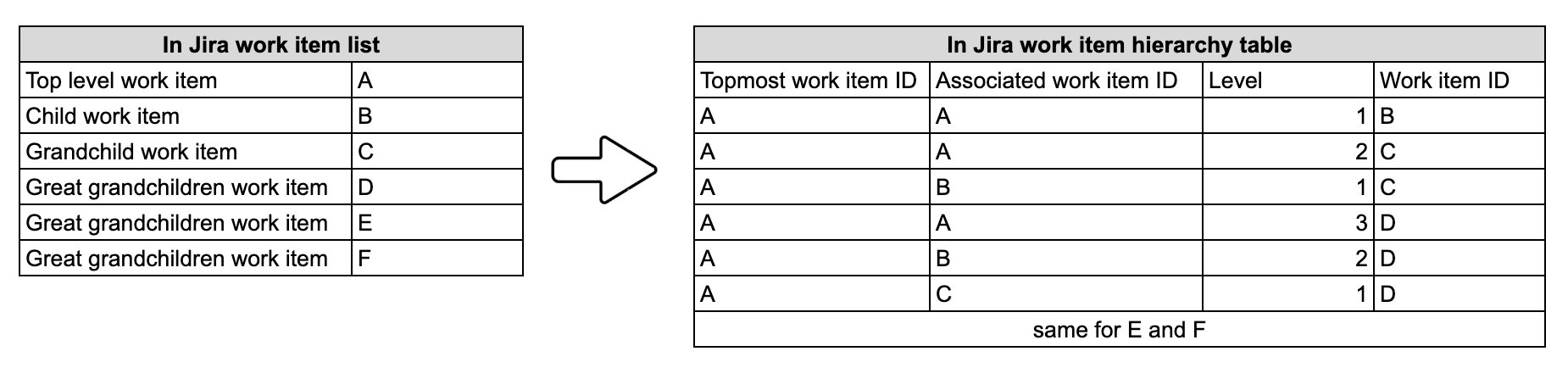
This table put all hierarchy relationship between any 2 work items into one row.
|
Column name
|
Explanation
|
|---|
|
Work item ID
|
This is primary key, the work item this Associated ID refers to
|
|
Associated work item ID
|
The work item this particular row reference to
|
|
Topmost work item ID
|
The highest ranked work item in this chain, it duplicate for all record in the same chain
|
|
Level
|
Level = 1 is the immediate children under that associated work item. The smaller the number, the further up in the hierarchy
|
A few more notes:
-
This is a pre-computed table. It takes 5-8 hours for new changes to get reflected
-
If a Jira work item does not have any children or parents, then it will not show up in this table
-
If any work item become missing in the hierarchy chain, then, it will split the hierarchy chain into two. If B is deleted from chain A→B→C→D, then C and D lose their connection to A entirely. C becomes the new topmost for everything below it.
-
Max 10 levels are included. If you have a 12 level hierarchy chain, then the last 2 levels from the bottom (11 and 12) will not show up.
How to get the new tables
For new Data Lake connections that include Jira and Jira Family of Apps data, the new tables will automatically be available.
For existing Data Lake connections, an organization admin needs to edit the connections. If the connection already includes Jira and Jira Family of Apps data, the organization admin can edit the connection and save it without making any changes. More about editing Data Lake connections.
Send us your feedback
Comment below or contact support if you have any questions or concerns. Thanks!
