Hi community!
A group of key Jira configuration tables are now available! These data points represent the core building blocks used to define how work is structured and managed within Jira.
-
Jira Workflow, Work Item Type and Work Item Status: Define the lifecycle, available Work Item Type and Status of work.
-
Workflow Scheme and Work Item Type Scheme: Acts as a "join-table" to share configurations of Workflows and Work Item Type across projects.
-
Field Visibility: Controls which Work Item fields appear for specific work Types.
-
Project Key History: Tracks changes to Jira space key over time
The new data is gradually rolling out in the coming 1-2 weeks.
New Tables and Columns
For Analytics
Main new tables - under the Jira Family of Apps schema:
-
'Workflow' table - Jira workflow metadata
-
'Workflow scheme' table - Scheme description and attributes
-
'Work item type' table - Work item type that are made available (Bug, Story, Task, etc.)
-
'Work item type scheme' table - Defines which work item types are available in a Space
-
'Work item status' table - Status definitions available (To Do, In Progress, Done, etc.)
-
'Project field visibility' table - Defines which fields are visible per Work Item Type within a Space
-
'Work item field metadata' table - Metadata about available Work Item fields
-
‘Project key history’ table - Stores Jira Space key history
Mapping tables that flatten out relationships:
-
'Workflow scheme mapping' table - Maps between Workflow scheme and Space
-
'Workflow work item type mapping' table - Links Workflow, Work Item Type and Space
-
'Workflow status mapping' table - Maps workflows to their available Work Item statuses
-
'Work item type scheme mapping' table - Maps Work Item Type schemes to their Work Item Types and Space
-
'Work item type mapping' table - Maps individual work items to their work item type and space
In addition, new columns added to the existing ‘Project’ table:
To see all the new data, please toggle on ‘Show full schema’.
For data share
New tables:
- jira_workflow
- jira_workflow_scheme
- jira_issue_type_scheme
- jira_project_field_visibility
In addition, new columns have been added to the existing jira_project table:
-
key_history
-
project_configuration_id
-
notification_type_scheme_id
-
issue_type_screen_scheme_id
-
issue_type_scheme_id
-
issue_security_scheme_id
-
issue_field_layout_scheme_id
-
workflow_scheme_id
-
permission_scheme_id
How to use the new data
1. Understand Workflow
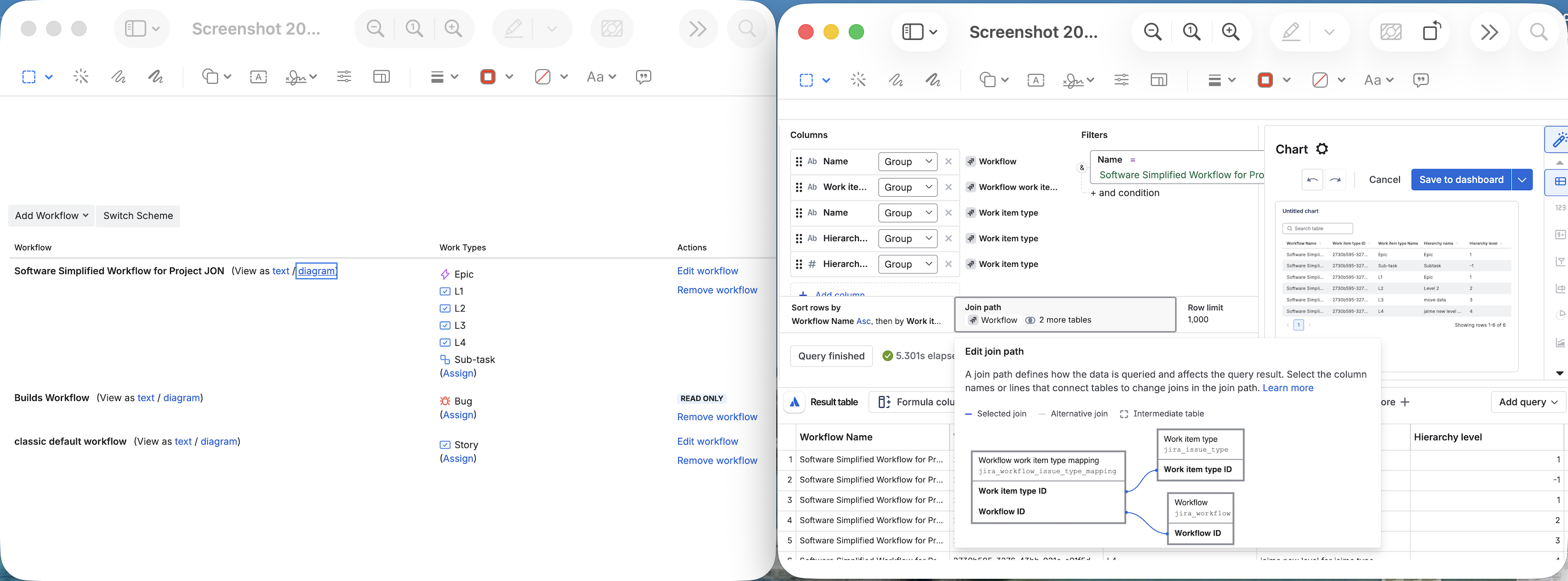
A workflow defines the path that work items take through your team's process — from creation to completion. Each workflow is made up of a set of work item types, statuses and transitions.
Workflow <> Work item type
Work Item <> Workflow
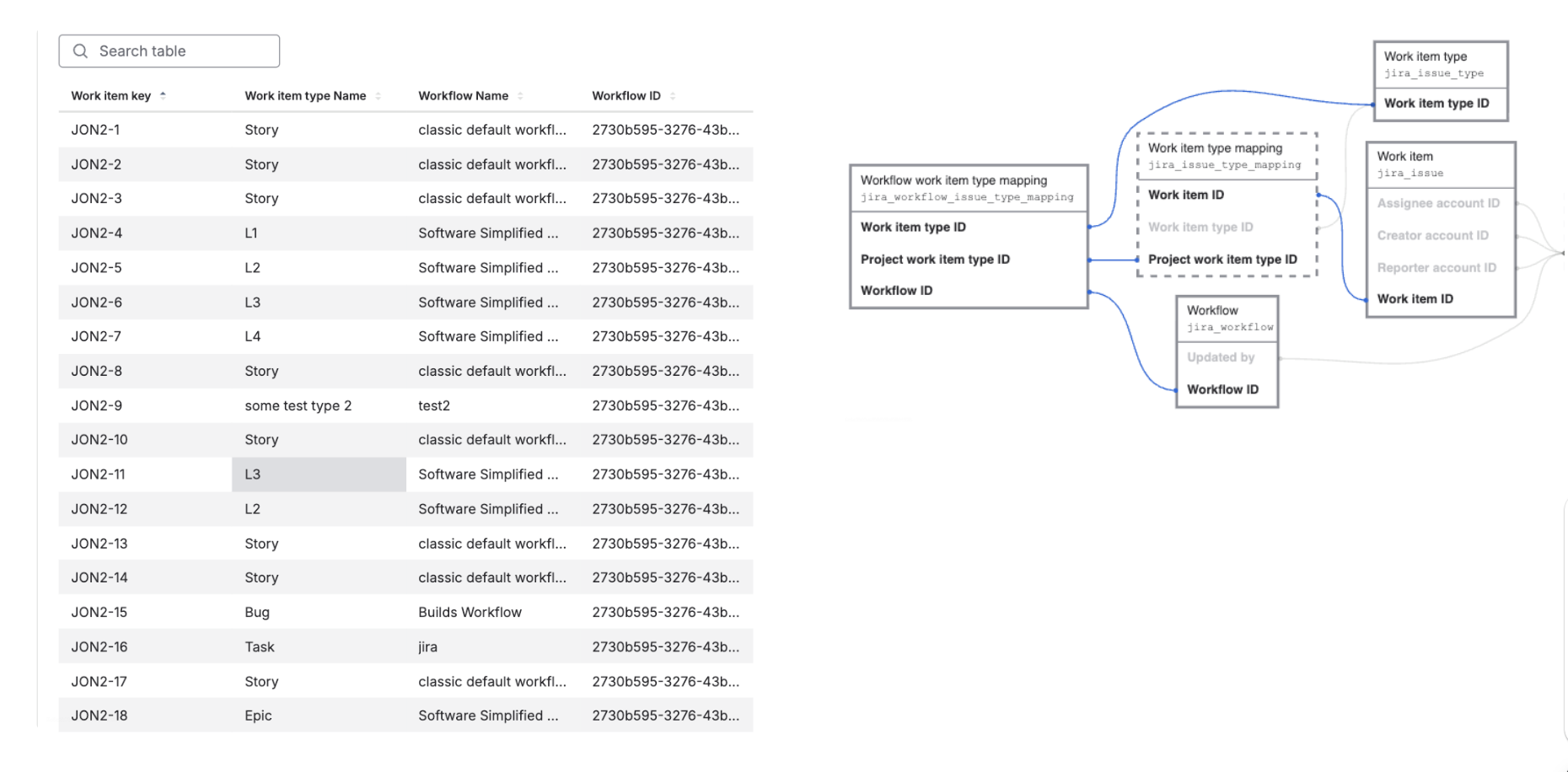
⚠️ Caveats
The ‘Updated by’ column in ‘Workflow’ table is intentionally not pre-configured as a visual join path. If you need to identify who last updated a workflow, please use a manual SQL join: jira_workflow.updated_by = account.account_id.
2. Use Schemes to link Work flow and Work item types and Status
Workflow schemes are the configuration layer that maps workflows to specific work item types.
-
Workflow schemes - define which workflows are used in a space, and which work item types use which workflow
-
Work item type schemes - define which work item types are available in a space
Work flow scheme <> Work flow

Work flow scheme → Work flow → Work item status
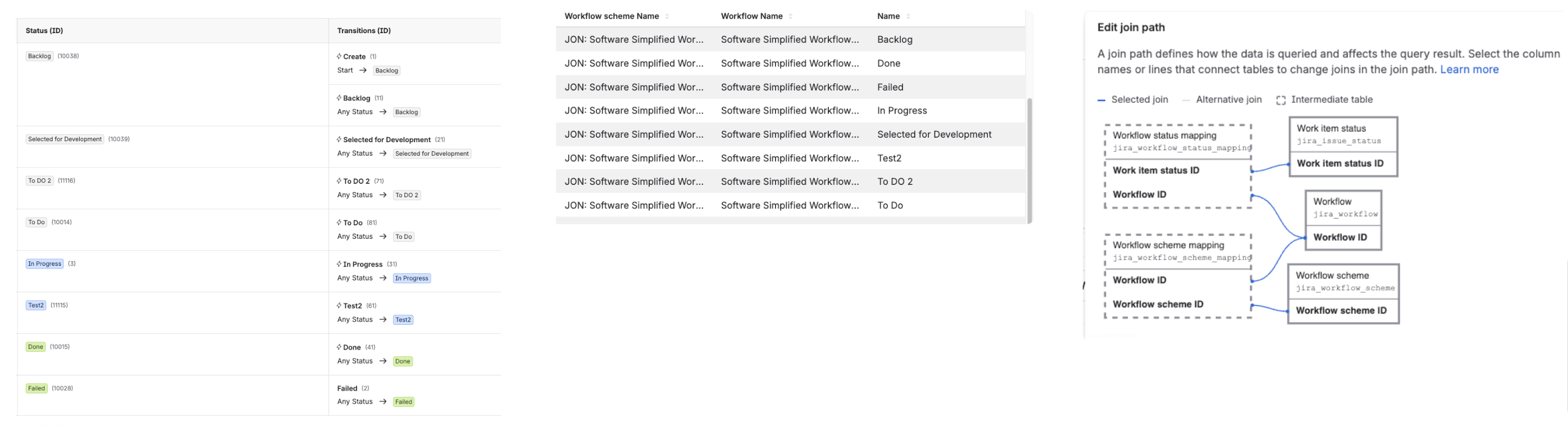
3. Get Field Visibility
Field visibility controls which work item fields appear on work items for each work item type within a space.
Note on row count: Rows in 'Project Field visibility' are per work item type, not per field. This table contains one row per work item type per space. A space with 10 work item types may show the same field multiple times, once for each work item type. If you want a flat list of unique fields for a space, group by ‘Project ID’ and ‘Field name’.
How to get the new data
On Analytics:
-
For new Data Lake connections that include Jira data, the new tables and columns will automatically be available.
-
For existing Data Lake connections, an organization admin needs to edit and save the connection. If the connection already includes Jira data, the admin can edit and save it without making any changes to pick up the new tables. More about editing Data Lake connections.
On data share, the new tables and columns will automatically be available.
Send us your feedback
Comment below or contact support if you have any questions or concerns. Thanks!
