Hello!
In this article I will tell you how to handle insecure SSL certificate sites with Prometheus for Jira, Prometheus for Confluence , Prometheus for Bitbucket and Prometheus for Bamboo apps.
Suppose, you connect to a Jira, Confluence, Bitbucket or Bamboo instance with an insecure ssl certificate and you have the following config file:
global:<br> scrape_interval: 15s # Set the scrape interval to every 15 seconds. Default is every 1 minute.<br> evaluation_interval: 15s # Evaluate rules every 15 seconds. The default is every 1 minute.<br> # scrape_timeout is set to the global default (10s).<br> <br> <br> <br># A scrape configuration containing exactly one endpoint to scrape:<br>scrape_configs:<br> - job_name: 'jira'<br> scheme: https #change to http if don't you have https<br> metrics_path: '/plugins/servlet/prometheus/metrics'<br> static_configs:<br> - targets: ['yourinstance.com']
In this case if you run Prometheus and choose the System → Targets menu you will see the following message:
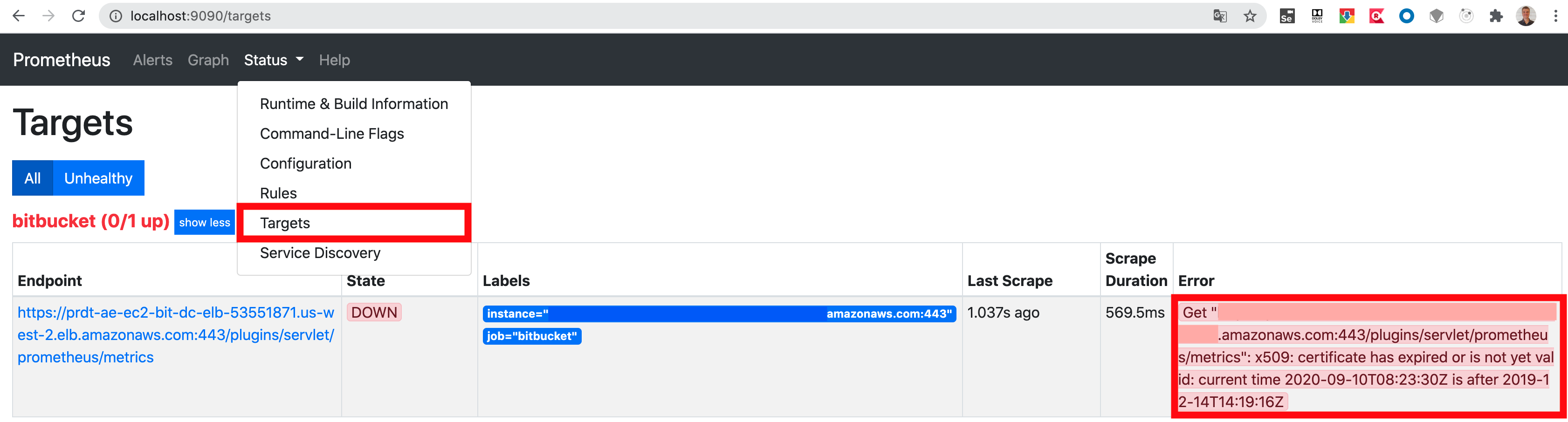
As you can see the error is:
x509: certificate has expired or is not yet valid
We need to tell Prometheus not to check the ssl certificate and we can do it with the following parameters:
tls_config:<br> insecure_skip_verify: true
And your final config file would look like this:
# my global config<br>global:<br> scrape_interval: 15s # Set the scrape interval to every 15 seconds. Default is every 1 minute.<br> evaluation_interval: 15s # Evaluate rules every 15 seconds. The default is every 1 minute.<br> # scrape_timeout is set to the global default (10s).<br> <br> <br> <br># A scrape configuration containing exactly one endpoint to scrape:<br>scrape_configs:<br> - job_name: 'bitbucket'<br> scheme: https #change to http if don't you have https<br> metrics_path: '/plugins/servlet/prometheus/metrics'<br> static_configs:<br> - targets: ['yourinstance.com']<br> tls_config:<br> insecure_skip_verify: true
Now your endpoint will up and ready.

