Hi! I created a few subtasks on JIRA, but I when I try to open them, I receive this pop-up:
 I'm not sure why this is occurring. One possible root cause could be that when I try to add a new ticket to my Kanban board (create a new issue), the only issue type options are: epic, task. A subtask does not appear in the dropdown. I'm not sure if this a bug or yet another intentional quirk of JIRA.
And here's proof that I absolutely included 'subtask' as an issue type in the project settings:
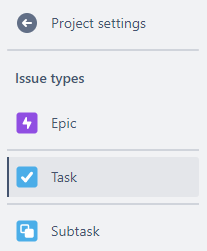
Please help me solve this puzzle!


