cancel
Showing results for 
Search instead for 
Did you mean: 

Original Estimate VS Time Tracking

Accepted Solution

Original Estimate VS Time Tracking

I want to compare the original estimate and time-tracking data for issues that are in a sprint. So, I can evaluate if estimation time guesses failed or were successful and how is the failure rate for a sprint is. 
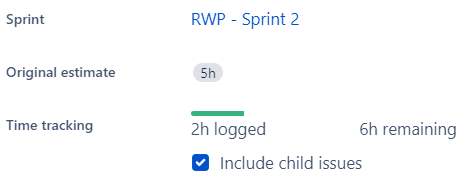
- Agile board - JIRA.png

How can I compare these data and see them as a report?
Is there a way to do it with confluence tools, dashboard widgets, etc?
I'm open to any suggestions. Thanks.

Accepted Solutions (1)

Accepted Solutions (1)

Trudy Claspill
Community Champion
Solution

Hello @Özge Özgenç 

The Work Ratio field will show what percentage of the Original Estimate has been consumed by time logged. You can see the information in the Advanced Issue Search screen when you use List View and add the Work Ratio column. A Work Ratio over 100% indicates more time was logged than in the Original Estimate.

Screen Shot 2023-03-30 at 11.43.42 AM.png

The same information can be shown in Confluence using a Jira Macro.

Screen Shot 2023-03-30 at 11.47.18 AM.png

Answers (1)

Answers (1)

Mark Barber
I'm New Here

The suggested Work Ratio does not take into account sub-tasks.  I suggest using the "Time Tracking Report" that can be found in the "Reports" menu for your Project.  This provides a detailed report that also includes sub-tasks.


report.png